
 EN
EN



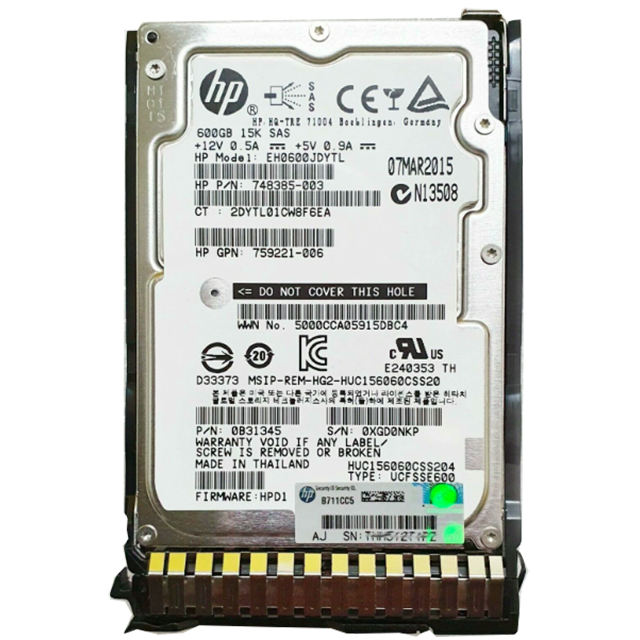
Understanding the performance differences between server HDDs and SSDs is crucial for making informed decisions about enterprise storage infrastructure. While both technologies serve the fundamental purpose of data storage, their performance characteristics vary dramatically, affecting everything from application response times to overall system efficiency. Server environments demand reliable, high-performance storage solutions that can handle intensive workloads, making the choice between server HDDs and SSDs a critical consideration for IT professionals.
The performance gap between server HDDs and SSDs has significant implications for data center operations, application performance, and business continuity. Server administrators must evaluate multiple performance metrics including read/write speeds, input/output operations per second (IOPS), latency, and power consumption to determine which storage technology best fits their specific requirements. This comprehensive comparison will examine the key performance differences that distinguish these two storage technologies in enterprise environments.
Speed and Throughput Performance Differences
Sequential Read and Write Speed Comparison
Sequential performance represents one of the most significant differentiators between server HDDs and SSDs. Traditional hard disk drives typically achieve sequential read speeds between 100-200 MB/s, while enterprise SSDs can deliver sequential reads exceeding 500 MB/s, with high-end NVMe SSDs reaching speeds over 3,500 MB/s. This substantial performance advantage makes SSDs particularly effective for applications requiring large file transfers, database backups, and content streaming services.
Write performance differences are equally pronounced, with server HDDs generally achieving write speeds of 80-150 MB/s compared to SSDs that can sustain write speeds of 400-3,000 MB/s depending on the interface and controller technology. The consistent performance delivery of SSDs contrasts sharply with HDDs, which may experience performance degradation as the drive fills up or when dealing with fragmented data across different sectors of the spinning disk.
Enterprise workloads that benefit most from the superior sequential performance of server HDDs and SSDs include video editing, large database operations, and backup processes. Organizations handling big data analytics or running memory-intensive applications will notice significant performance improvements when transitioning from traditional hard drives to solid-state storage solutions.
Random Access Performance Characteristics
Random access performance reveals the most dramatic differences between server HDDs and SSDs, with implications that extend far beyond simple speed measurements. HDDs must physically move read/write heads to access different data locations, creating mechanical delays that typically result in random access times of 5-10 milliseconds. In contrast, SSDs access data electronically without mechanical movement, achieving random access times measured in microseconds rather than milliseconds.
This random access advantage translates into superior performance for database operations, virtual machine environments, and any application requiring frequent small file access. Server environments running multiple concurrent applications particularly benefit from SSD random access performance, as the storage system can handle numerous simultaneous requests without the bottlenecks associated with mechanical drive limitations.
The random read/write performance differential becomes especially critical in virtualized environments where multiple operating systems and applications compete for storage resources. Server HDDs and SSDs demonstrate vastly different capabilities when handling the mixed workload patterns typical of modern data centers.
Input/Output Operations Per Second (IOPS) Analysis
Read IOPS Performance Metrics
Input/Output Operations Per Second (IOPS) represents a critical performance metric that distinguishes server HDDs and SSDs in enterprise environments. Traditional server HDDs typically deliver between 100-200 IOPS for random operations, while enterprise SSDs can achieve 10,000-100,000+ IOPS depending on the specific technology and configuration. This dramatic difference in IOPS capability directly impacts application responsiveness and system scalability.
Read IOPS performance varies significantly based on queue depth and access patterns. Server HDDs perform better with sequential access patterns but struggle with high queue depths due to mechanical limitations. SSDs maintain consistent IOPS performance across various queue depths and access patterns, making them more predictable and reliable for demanding server applications.
Enterprise applications such as online transaction processing (OLTP) databases, email servers, and web applications with frequent database queries benefit tremendously from the superior read IOPS capabilities of SSDs. The ability to handle thousands of simultaneous small read operations makes SSDs particularly valuable in environments where user experience depends on rapid data retrieval.
Write IOPS and Mixed Workload Performance
Write IOPS performance presents unique challenges that further differentiate server HDDs and SSDs in enterprise deployments. While HDDs typically achieve write IOPS in the range of 80-160 operations per second, SSDs can sustain thousands of write IOPS, though performance may vary based on the specific NAND flash technology and controller optimization.
Mixed workload scenarios, where applications simultaneously perform read and write operations, highlight the advantages of SSD architecture. Server HDDs experience significant performance degradation when handling mixed workloads due to head movement requirements, while SSDs maintain consistent performance levels regardless of the read/write operation mix.
The write endurance characteristics of server HDDs and SSDs also impact long-term performance considerations. While HDDs can theoretically handle unlimited write cycles, their mechanical nature makes them susceptible to wear-related performance degradation. Modern enterprise SSDs incorporate wear leveling and over-provisioning technologies to maintain consistent write performance throughout their operational lifespan.
Latency and Response Time Characteristics
Access Latency Fundamentals
Access latency represents the time required to locate and begin transferring requested data, fundamentally distinguishing server HDDs and SSDs in terms of user experience and application performance. Traditional hard drives exhibit access latencies between 3-15 milliseconds due to mechanical seek times and rotational delays, while SSDs achieve access latencies measured in microseconds, typically ranging from 50-500 microseconds for enterprise-grade devices.
The mechanical nature of HDDs introduces variable latency based on the physical location of data on the disk platters. Outer tracks provide faster access than inner tracks, and data fragmentation can significantly increase average access times. SSDs eliminate these variables by providing consistent electronic access to all storage locations, resulting in predictable and uniform latency characteristics.
Low-latency requirements in server environments make SSDs particularly valuable for real-time applications, high-frequency trading systems, and interactive databases where even small delays can impact business operations. The consistent sub-millisecond latency of SSDs enables more responsive user interfaces and faster application processing cycles.
Queue Depth Impact on Response Times
Queue depth significantly affects the response time characteristics of server HDDs and SSDs under concurrent load conditions. HDDs experience exponential increases in response times as queue depth increases, since mechanical components can only service one request at a time effectively. Deep queues force subsequent requests to wait for mechanical positioning, creating bottlenecks that cascade through the entire storage system.
SSDs handle increased queue depths much more gracefully, maintaining relatively stable response times even under heavy concurrent load. Advanced SSD controllers can process multiple requests simultaneously through internal parallelism, preventing the dramatic response time degradation characteristic of mechanical storage devices.
Enterprise server environments with multiple virtual machines, databases, and applications benefit from the superior queue depth handling of SSDs. The ability to maintain consistent response times under varying load conditions makes SSDs more suitable for mission-critical applications where predictable performance is essential for business operations.
Power Consumption and Thermal Performance Impact
Energy Efficiency Comparison
Power consumption differences between server HDDs and SSDs have significant implications for data center operations, affecting both operational costs and cooling requirements. Traditional server HDDs typically consume 6-15 watts during active operation due to motor requirements for spinning disks and moving actuator arms, while enterprise SSDs generally consume 2-8 watts under similar workload conditions.
The energy efficiency advantage of SSDs becomes more pronounced during idle periods, where HDDs continue consuming power to maintain disk rotation while SSDs can enter low-power states consuming less than 1 watt. This difference is particularly important in large server deployments where thousands of storage devices contribute to overall power consumption and cooling loads.
Performance per watt calculations favor SSDs significantly, as they deliver superior IOPS and throughput while consuming less power than HDDs. This efficiency advantage translates into reduced electricity costs, lower cooling requirements, and improved overall data center sustainability metrics for organizations focused on green computing initiatives.
Thermal Management and Performance Throttling
Thermal characteristics of server HDDs and SSDs directly impact sustained performance capabilities in enterprise environments. HDDs generate heat through mechanical friction and motor operation, requiring adequate airflow to maintain optimal operating temperatures. Excessive heat can cause mechanical components to expand, potentially affecting performance and reliability.
SSDs generate less heat overall but may experience performance throttling when NAND flash memory or controllers exceed temperature thresholds. Modern enterprise SSDs incorporate thermal management features that reduce performance temporarily to prevent damage, though this throttling typically occurs only under extreme conditions or inadequate cooling scenarios.
The lower heat generation of SSDs allows for denser storage configurations in server chassis, potentially increasing storage capacity per rack unit. This thermal advantage enables more flexible server design and can reduce cooling infrastructure requirements in data center environments where server HDDs and SSDs are deployed at scale.
FAQ
Which storage type provides better performance for database servers?
SSDs provide significantly better performance for database servers due to their superior IOPS capabilities, lower latency, and ability to handle mixed read/write workloads efficiently. Database applications benefit from the rapid random access performance of SSDs, resulting in faster query response times, improved transaction processing, and better overall user experience compared to traditional HDDs.
How do server HDDs and SSDs compare in terms of sustained performance under heavy workloads?
SSDs maintain more consistent performance under heavy workloads compared to HDDs, which can experience significant performance degradation due to mechanical limitations and thermal effects. While HDDs may deliver acceptable performance during light usage, they struggle with concurrent operations and high queue depths. SSDs provide predictable performance across varying load conditions, making them more suitable for demanding server applications.
What performance factors should be considered when choosing between HDDs and SSDs for server applications?
Key performance factors include IOPS requirements, latency sensitivity, sequential throughput needs, power consumption constraints, and thermal considerations. Applications requiring high random access performance, low latency, or handling numerous concurrent operations benefit from SSDs. Organizations should evaluate their specific workload patterns, performance requirements, and budget constraints to determine the optimal balance between server HDDs and SSDs for their environment.
Do SSDs always provide better performance than HDDs in server environments?
While SSDs generally provide superior performance in most metrics, the specific advantage depends on the workload characteristics and application requirements. For applications primarily involving large sequential file transfers or archival storage where access frequency is low, high-capacity HDDs may provide adequate performance at lower cost per gigabyte. However, for most modern server applications requiring responsiveness and concurrent access, SSDs deliver substantially better performance than traditional HDDs.
Table of Contents
- Speed and Throughput Performance Differences
- Input/Output Operations Per Second (IOPS) Analysis
- Latency and Response Time Characteristics
- Power Consumption and Thermal Performance Impact
-
FAQ
- Which storage type provides better performance for database servers?
- How do server HDDs and SSDs compare in terms of sustained performance under heavy workloads?
- What performance factors should be considered when choosing between HDDs and SSDs for server applications?
- Do SSDs always provide better performance than HDDs in server environments?